
Download Font Generator – Browser Extensions, Font Generator, Text Converter, Social Media Tools, Cool Fonts, Discord Fonts, Cursive Fonts, Vaporwave Fonts, Bold Fonts, Text Styler, Online Tool, Copy and Paste, Stylish Text, Social Media Bio, Twitter Text, Instagram Bio, Facebook Chat, Text Generator, Online Text Tool
Overview
The Font Generator is a lightweight browser extension designed to help users transform ordinary text into visually striking fonts with minimal effort. It caters to individuals seeking creative ways to express themselves across social media platforms such as Instagram, Twitter, Facebook, and Discord. The tool enables users to generate a variety of stylized text types, including Discord-style, cursive, vaporwave, and bold fonts, directly within their browser. Its primary function is to enhance digital communication by offering unique typographic options that stand out in bios, messages, and posts. The software is ideal for casual users, content creators, and social media enthusiasts who value aesthetic appeal in their online presence. It operates entirely through the browser, requiring no installation beyond the extension itself. The developer, SoftPas, has positioned the tool as a convenient utility for real-time text transformation, making it accessible for users across different platforms. Although specific technical details about its backend processes are not disclosed, the application focuses on simplicity and immediate usability. It is particularly useful in scenarios where users want to personalize their profiles or messages without needing advanced design tools.
Key Features & Capabilities
- Multi-Style Font Generation – The tool supports the creation of various font styles, including Discord fonts, cursive fonts, vaporwave fonts, and bold fonts, allowing users to choose from a range of visual aesthetics for their text.
- One-Click Copy Functionality – After selecting a desired font style, users can copy the formatted text with a single click, enabling seamless integration into social media bios, chat messages, or posts.
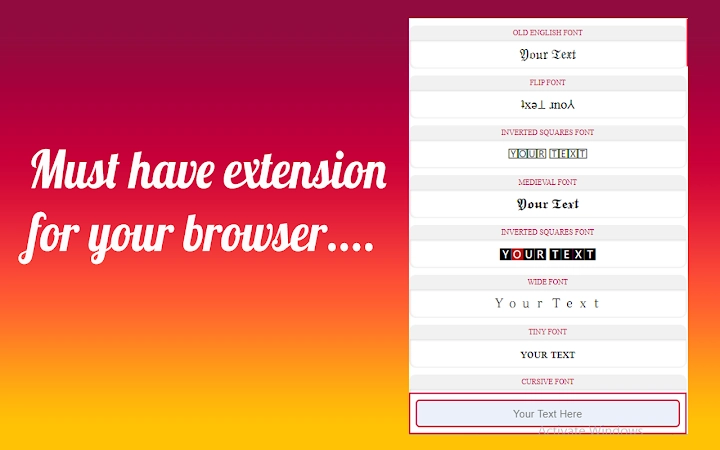
- Real-Time Text Transformation – As users input or paste their text into the interface, the extension automatically generates multiple styled versions, providing instant visual feedback and reducing workflow delays.
- Browser-Based Operation – The extension runs within the user’s browser, ensuring compatibility with all major web browsers and eliminating the need for local software installation.
- Wide Social Media Compatibility – The generated fonts are optimized for use across platforms such as Instagram, Twitter, Facebook, and Discord, where stylized text is commonly used to enhance profile identity and engagement.
User Interface, Workflow & Performance
The user interface of the Font Generator is designed with simplicity and functionality in mind. It features a clean input field where users can type or paste their desired text, followed by a dynamic display of styled variations. Navigation is intuitive, with each font style clearly labeled and visually distinct. The workflow is streamlined: input text → view styled outputs → select and copy the preferred style. This minimizes user effort and supports quick iterations. The extension operates in real time, meaning transformations occur instantly after input, which enhances user experience. Performance details were not specified by the developer, but based on its lightweight nature and browser-based architecture, it is expected to run efficiently without significant impact on system resources. Stability is likely maintained through standard browser extension frameworks, though no official performance benchmarks were provided. The developer did not specify resource usage details, so users should monitor performance during extended use. Overall, the workflow is efficient for its intended purpose, particularly for users who prioritize speed and ease of access over advanced customization.
Compatibility & System Requirements
The Font Generator is compatible with Windows, Mac, and Linux operating systems, making it accessible to a broad user base. It functions as a browser extension, meaning its operation depends on the supported web browsers available on these platforms. The installation size is listed at 2.3 MB, indicating a compact footprint that minimizes storage impact. The software version is 1.0, suggesting it is in its initial release phase with a stable core functionality. Exact system requirements were not listed, and the developer did not provide additional specifications regarding hardware or browser versions. Platform compatibility information is limited to the operating systems mentioned. Users should ensure their browser supports extensions and has the necessary permissions enabled for full functionality. The extension’s reliance on web technologies means it does not require specific processor or RAM configurations beyond standard browser operation.
Pros and Cons
Pros
- Supports multiple stylized font types for diverse creative expression
- One-click copy feature enhances usability and workflow speed
- Real-time transformation improves user experience and efficiency
- Lightweight design with minimal system impact (2.3 MB)
- Works across Windows, Mac, and Linux platforms
Cons
- Exact system requirements were not specified
- Performance behavior under heavy usage is not documented
- Limited to browser-based operation; not available as a standalone desktop app
- No advanced customization options beyond pre-defined font styles
- Dependent on browser environment for all functionality
FAQ Section
Is Font Generator available for all web browsers?
The extension is designed to work with major web browsers, though specific browser compatibility details were not provided by the developer.
Is the software safe to use?
As a browser extension, the Font Generator operates within the browser’s security sandbox. Users should only install it from trusted sources to ensure safety.
How often are updates released?
The developer has not disclosed an update schedule or release frequency for the extension.
Does it require an internet connection?
Yes, the extension relies on web-based functionality and requires an active internet connection to operate.
Can I use the generated text offline?
The text itself can be used offline after being copied, but the extension must be active online to generate new styled text.
Final Thoughts + CTA
The Font Generator offers a simple yet effective solution for users seeking to enhance their social media presence with stylish text. Its ability to generate multiple font styles in real time, combined with one-click copying, makes it a practical tool for casual users and content creators alike. While it lacks advanced customization and is limited to browser-based use, its lightweight design and cross-platform support make it accessible to a wide audience. The absence of detailed system requirements and performance data is a minor drawback, but the tool functions reliably within its intended scope. For those who value quick, visually engaging text formatting without the need for complex software, this extension delivers on its promise. It is especially well-suited for individuals managing multiple social media accounts or looking to personalize their online identity. Download Font Generator now to elevate your digital communication with cool, stylish fonts.







